
What Is the Floating Loss Rule (FLR) in Prop Trading?
Learn how prop firm floating loss rules work, compare live-loss and stop-risk formulas, and calculate safer position sizes before trading.
A floating loss rule can limit the risk of one position, one trade idea, or every open position on a prop trading account. The difficult part is that FLR is not a standardized industry formula. One program may monitor unrealized loss in real time, another may calculate the maximum possible loss at the stop-loss, and another may group several related positions into one trade idea.
That means a statement such as “the FLR is 2%” is incomplete. Before calculating anything, you need to identify the percentage base, the risk metric, the position-grouping logic, the threshold operator, and the consequence of reaching the limit.
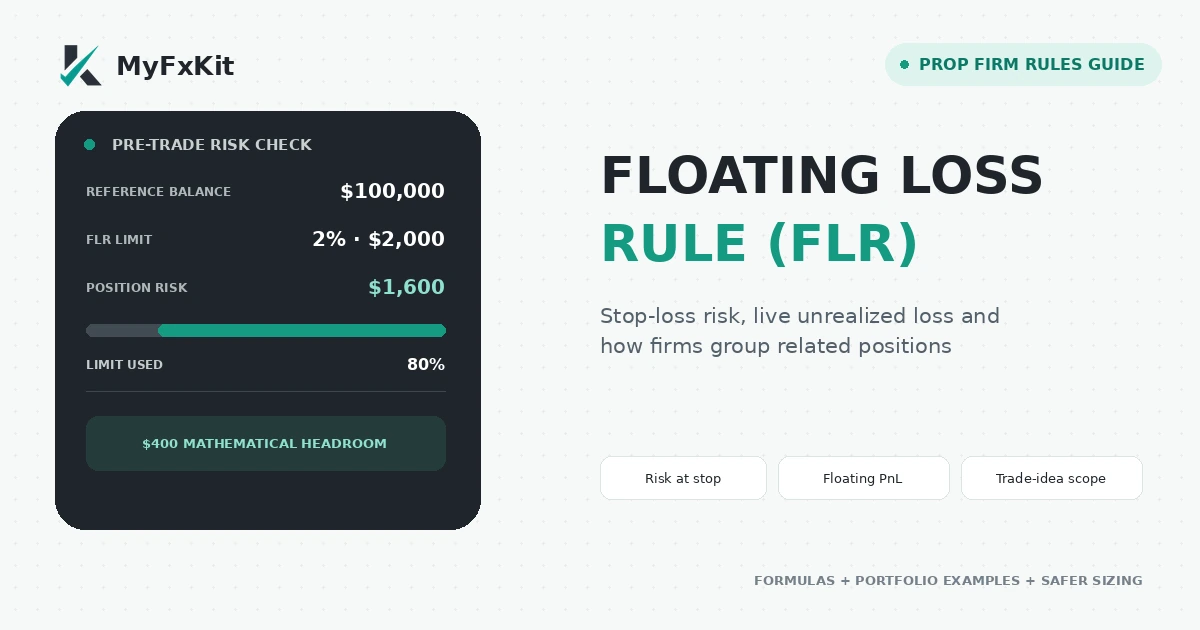
An FLR may measure planned stop-loss risk or the actual floating loss of open positions. The rulebook must tell you which one applies.
Written by: MyFxKit Content Team · Technical review: MyFxKit Technical Team
Rules last verified: August 30, 2026. Prop firm rules can change. Recheck the official page for your exact program, account size, phase, and purchase date before placing a trade.
What does FLR mean in prop trading?
FLR usually means Floating Loss Rule, but firms may publish a similar restriction under names such as Max Floating Loss, Max Open Risk, Maximum Risk Per Trade, or Risk Per Trade Idea.
Those labels do not necessarily describe the same calculation. Depending on the program, the monitored value may be:
- The notional exposure or total open volume;
- The maximum planned loss if price reaches the stop-loss;
- The current unrealized loss of an open position;
- The combined realized and unrealized loss of related positions;
- The combined unrealized loss of every losing position on the account.
The percentage may also be based on the starting account size, initial balance, current balance, current equity, or another reference value defined by the firm. Replacing one base with another can materially change the permitted dollar risk.
The four questions that define the real rule
Do not calculate an FLR until you can answer all four questions below.
- Metric: Is the firm measuring exposure, loss at the stop, realized loss, unrealized loss, or a combination?
- Reference base: Is the percentage calculated from starting balance, current balance, equity, account size, or a daily baseline?
- Scope: Does the cap apply to one ticket, one instrument and direction, one trade idea, or the entire account?
- Boundary and consequence: Does touching the threshold trigger a warning, forced closure, reduced reward split, or account breach?
If any answer is missing from the public rulebook, request a written clarification from support and keep the response.
Three FLR calculation models that must not be confused
| Model | What it measures | Required inputs | When it is checked |
|---|---|---|---|
| Exposure or open-volume model | Notional position value or open volume | Lots, contract size and market price | At entry and whenever volume changes |
| Stop-loss-risk model | Maximum planned loss between entry and SL | Stop distance and value per unit of movement | Before entry and after changing the SL |
| Live-floating-loss model | Current unrealized loss on open positions | Real-time PnL of the positions inside the rule scope | Continuously while positions remain open |
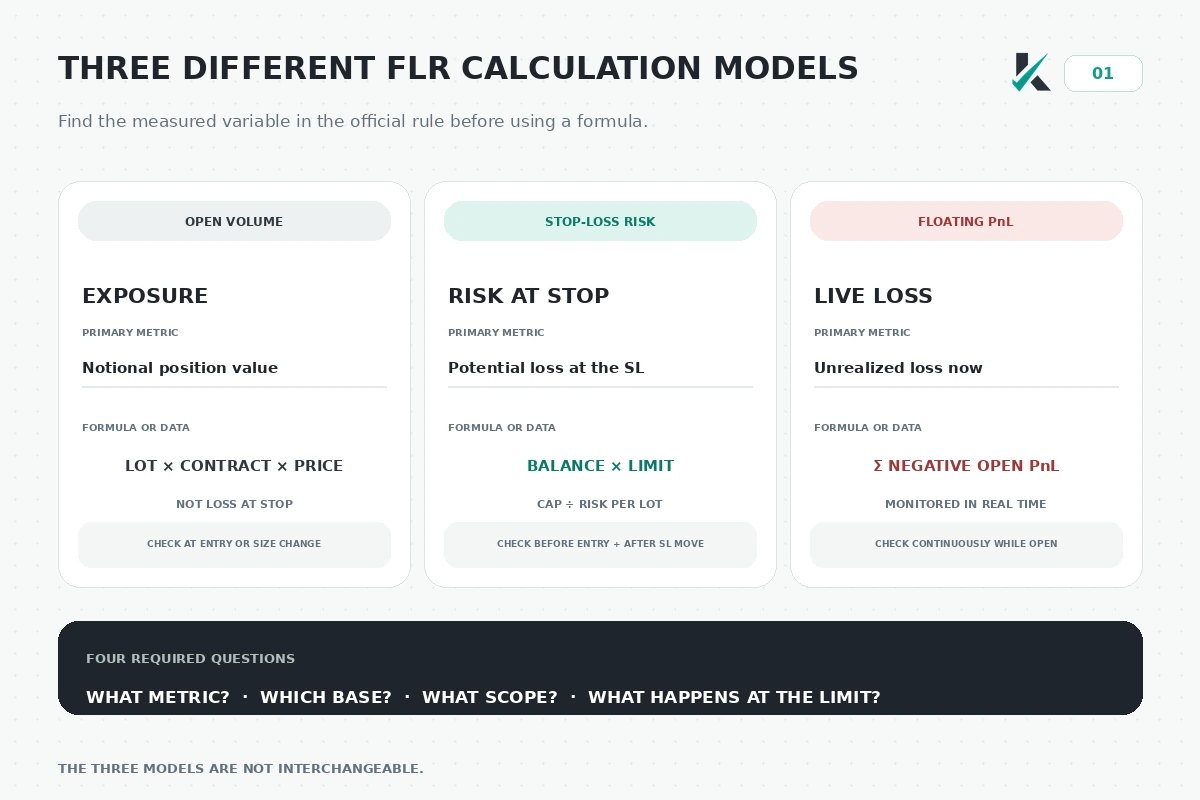
Exposure, planned stop-loss risk and live unrealized loss are different variables. The term FLR alone does not identify which variable is being limited.
Exposure or open-volume model
Notional exposure represents the face value of a position. It is not the amount that will necessarily be lost at the stop-loss.
Notional exposure = lots × contract size × market priceTwo positions can have equal exposure but very different loss potential because their stop distances are different. If a firm explicitly limits lots, margin or notional exposure, a stop-loss-risk formula cannot replace that restriction.
Planned risk at the stop-loss
This model first calculates the permitted dollar risk and then converts it into a maximum position size.
Dollar risk cap = reference balance × permitted percentage
Risk per lot = stop distance × value per unit of movement for one lot
Maximum lots = dollar risk cap ÷ risk per lot
For a $100,000 account with a 2% cap, the mathematical risk allowance is $2,000. If a $5 move in XAUUSD creates a $500 loss for one lot:
$100,000 × 2% = $2,000
$5 × $100 = $500 risk per lot
$2,000 ÷ $500 = 4.00 lots
Four lots is the mathematical ceiling, not a safe recommendation. Spread, commission, slippage and gaps can make the realized loss larger than the amount calculated from the displayed entry and stop prices.
Live unrealized-loss model
This model monitors the actual floating PnL of the positions included in the rule scope.
Combined floating loss = sum of the negative unrealized PnL values inside the rule scopeThe scope is critical. A portfolio-level rule can combine losses from unrelated instruments, while a trade-idea rule may combine only positions on the same instrument and in the same direction. Some rules ignore floating profits when aggregating losses, so a winning position may not offset the losing positions.
One position, one trade idea or the whole portfolio?
The percentage is only half the rule. The grouping logic determines which trades are added together.
Single-position scope
Each position is tested independently. A second ticket may receive a separate limit, but only if the rulebook genuinely treats it as a separate trade. Splitting one intended entry into several tickets does not automatically create several independent risk allowances.
Trade-idea scope
A trade idea can include multiple tickets on the same instrument and in the same direction. A firm may also connect a new position to a recently closed losing position when it is reopened within a specified time window.
For example, the current FundingPips definition groups simultaneous positions on the same instrument and in the same direction. It also links a new same-direction position opened within ten minutes of closing a losing position on that instrument. The combined realized and unrealized losses are then assessed against the applicable trade-idea cap.
Portfolio or account-wide scope
An account-wide rule adds the monitored loss across all open positions. Four individually small losses can therefore reach the limit even when no single trade is close to it.
This is why a per-trade calculator cannot determine compliance with a portfolio-level live-loss rule unless it also receives the real-time PnL of every open position.
Which account value is used as the percentage base?
Never assume that “2%” means 2% of the original account size.
| Percentage base | What it means | How the allowance can change |
|---|---|---|
| Starting account size | The nominal size when the account was issued | Usually remains fixed unless the rules define scaling or merging adjustments |
| Initial balance | The balance at the beginning of the relevant account or cycle | Often fixed, but the exact cycle must be confirmed |
| Current balance | The balance after closed trades | Falls after realized losses and rises after realized gains |
| Current equity | Balance plus current floating PnL | Can change tick by tick |
| Daily reference value | A balance or equity snapshot taken at reset | Recalculated according to the program's daily-reset logic |
If a $50,000 account falls to $47,000, a 2% cap is $1,000 when calculated from starting size but $940 when calculated from the current balance. The words used in the official formula decide which result is correct.
How to calculate a stop-loss-based FLR step by step
Use this workflow only when the official rule defines risk as the maximum loss at the stop-loss.
- Confirm the exact program, phase and account size.
- Record the permitted FLR percentage.
- Identify the official percentage base.
- Convert the percentage into a dollar cap.
- Calculate the stop distance in pips, points or price units.
- Calculate the dollar risk per lot for the selected instrument.
- Divide the risk cap by risk per lot, then subtract an execution buffer.
The general formula is:
Maximum lots = (reference value × FLR percentage × buffer factor) ÷ risk per lotA buffer factor of 0.90, for example, uses only 90% of the mathematical allowance. The correct buffer is not universal; it should reflect spread behavior, volatility, execution quality, commission and gap risk.
Worked example: one position with a 2% stop-risk cap
Assume the following conditions:
- Reference balance: $50,000;
- Maximum planned risk: 2%;
- Stop distance: 20 pips;
- Pip value for one standard lot: $10.
First calculate the dollar cap and risk per lot:
$50,000 × 2% = $1,000 risk cap
20 pips × $10 = $200 risk per lot
$1,000 ÷ $200 = 5.00 lots
At exactly five lots, the theoretical stop loss equals the full allowance. If the practical plan reserves a 10% execution buffer:
$1,000 × 90% = $900 usable risk
$900 ÷ $200 = 4.50 lots
The buffered size is 4.50 lots, provided there are no other positions grouped into the same trade idea and no separate volume or margin cap applies.
Worked example: portfolio-level floating loss
Assume a $100,000 account has a 1% maximum open-loss rule measured across all losing positions.
$100,000 × 1% = $1,000 floating-loss threshold
Position A = −$400
Position B = −$350
Position C = −$250
Combined floating loss = −$1,000
If the rule says the account breaches when the combined loss touches the threshold, the account is already at breach level. It does not need to lose $1,000.01.
A profitable fourth position should not be assumed to offset this total. Some programs calculate combined net PnL, while others explicitly assess losing positions or trade ideas without allowing profits to cancel the losses.
Worked example: positions grouped as one trade idea
Assume a $50,000 account uses a 1.2% warning threshold for one trade idea.
$50,000 × 1.2% = $600 threshold
XAUUSD sell position 1 = −$350
XAUUSD sell position 2 = −$250
Combined trade-idea loss = −$600
If both positions are grouped because they use the same instrument and direction, the idea has reached the threshold even though neither ticket reached it alone.
Does reaching the exact limit count as a breach?
It can, and many published rules explicitly treat equality as the trigger. The mathematical difference is:
Loss > limit   means only an amount beyond the limit triggers
Loss ≥ limit   means touching or exceeding the limit triggers
Wording such as “reaches,” “touches,” “hits,” or “cannot reach” usually signals that the exact boundary is included. FundingPips currently shows examples in which a combined loss exactly equal to the trade-idea limit is a breach. FundingPips Zero also states that touching the 1% maximum open-risk threshold breaches the account.
For operational risk management, treat the published limit as a hard boundary and size below it. Do not plan to stop at the last cent of the allowance.
Why a stop-loss may not protect the FLR boundary
A stop-loss is an execution instruction, not a guarantee that the trade will close at the requested price. The account's monitored loss can reach the rule threshold before or while the stop order executes.
Important sources of extra loss include:
- Spread widening before the stop triggers;
- Slippage in fast markets;
- Price gaps between tradable quotes;
- Commission charged when the position opens or closes;
- Swap or financing costs;
- Several correlated positions moving against the account together.
For a buy position, the stop is generally triggered by the bid price; for a sell position, it is generally triggered by the ask price. A chart displaying only one side of the quote can make the visible distance appear safer than the executable distance.
PropXP's current 1% floating-loss explanation specifically warns that volatility, news, low liquidity and slippage can make the combined floating loss reach the limit before the stop executes. The practical response is to leave a meaningful buffer rather than setting the stop exactly at the rule boundary.
FLR versus daily and overall drawdown
FLR is not simply another name for account drawdown. One floating loss can consume several limits at the same time, but the scopes and reset rules are different.
| Rule | Typical scope | Typical reference | Reset or movement | Main purpose |
|---|---|---|---|---|
| FLR or open-risk rule | Position, trade idea or all open positions | Starting size, balance or equity | Usually monitored continuously | Restrict concentration or open loss before the wider drawdown is exhausted |
| Daily drawdown | Entire account | Daily balance or equity baseline | Usually resets at a specified platform time | Limit loss during one trading day |
| Overall drawdown | Entire account | Initial value or a high-water mark | Static or trailing, depending on the program | Set the account's total loss floor |
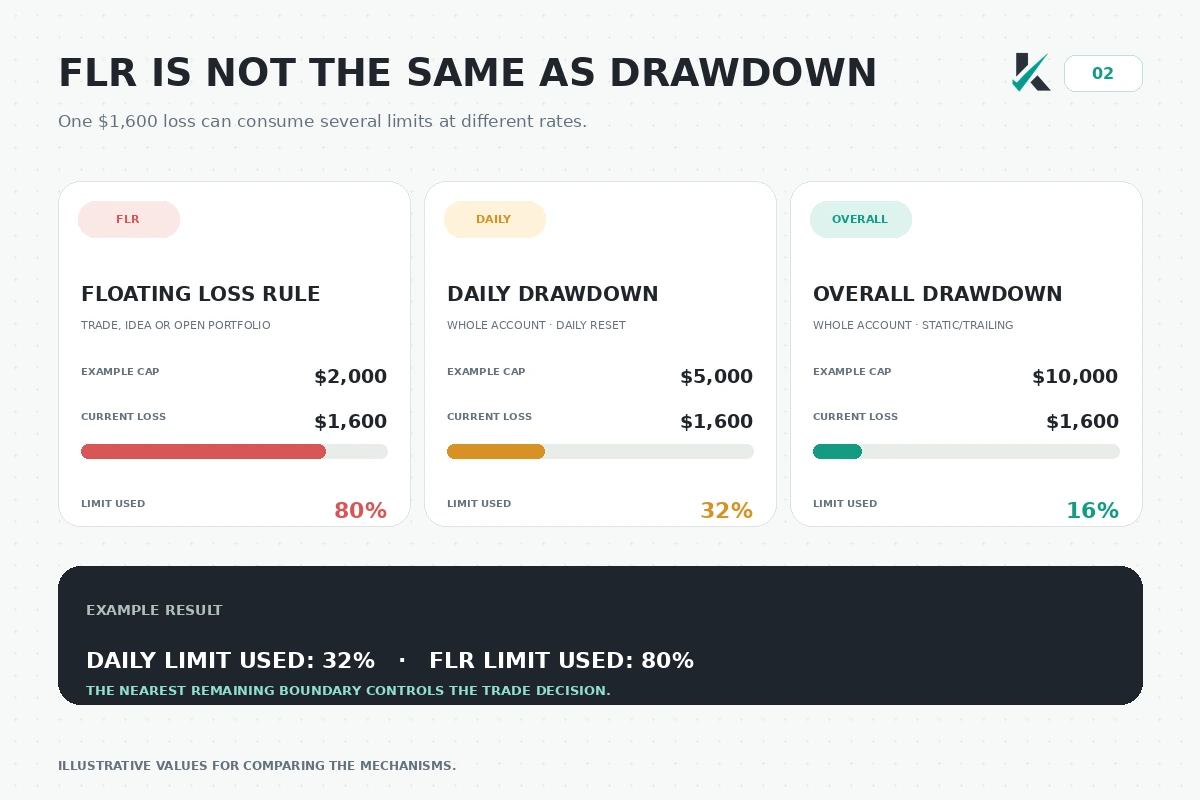
In this example, a $1,600 open loss uses 80% of a $2,000 FLR cap, 32% of a $5,000 daily limit, and 16% of a $10,000 overall limit.
Use the prop firm drawdown guide and drawdown calculator to model the account-level limits separately. A position is compliant only when it remains inside every applicable rule.
Current examples of program-specific rules
The examples below show why MyFxKit does not apply one global FLR formula to every firm.
| Program or rule | Current metric and scope | Percentage base | Boundary and consequence |
|---|---|---|---|
| FundingPips Zero: Max Open Risk | Combined unrealized loss across all open positions | 1% of starting account size | Touching −1% is stated as a breach |
| FundingPips Zero: Risk Per Trade Idea | Combined realized and unrealized losses across related positions | 3% below $50K; 2% at $50K and above | Hitting the applicable limit is a hard breach |
| FundingPips Risk Per Trade Idea and Striking System | Related positions are grouped by trade-idea logic | 2% or 3% for applicable hard caps; 1% or 1.2% for applicable warning systems | Consequence depends on the program: immediate closure or a cumulative warning ladder |
| Dolvero Maximum Risk Per Trade | Maximum loss if the trade reaches its stop; related tickets can be grouped | 2% of the current equity balance by default | Applies across stated evaluation and funded accounts unless the relevant addon removes it |
| PropXP 1% Max Floating Loss | Combined floating PnL across the Instant Funding portfolio | 1% for the stated rule | First occurrence auto-flattens and reduces the split; second occurrence breaches the account |
These rows are a research snapshot, not a substitute for the firm's contract or dashboard. Check whether your account was created before or after a rule update and whether an addon changes the restriction.
The FundingPips firm profile should therefore show rules by program rather than assigning one universal classification to the entire firm.
How to use the MyFxKit FLR calculator
The current MyFxKit FLR calculator models the planned-risk-at-stop method. It converts a percentage cap and stop distance into a mathematical maximum position size.
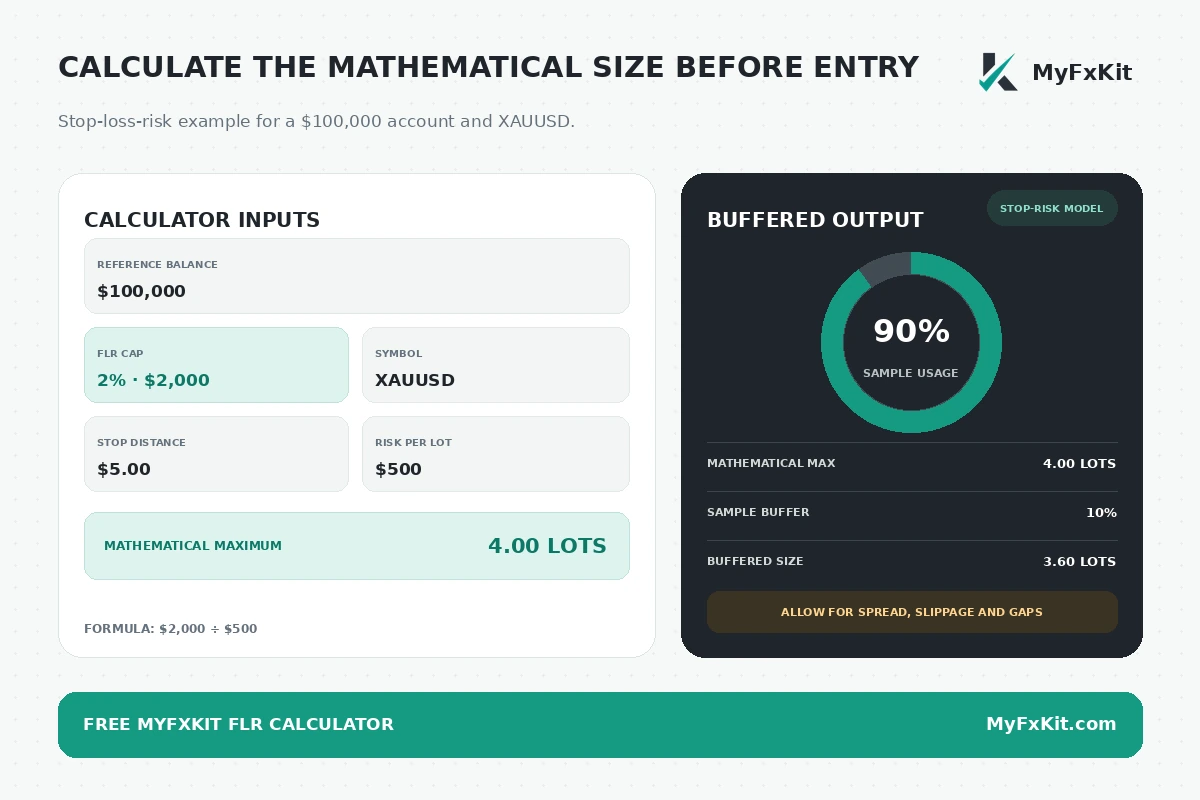
Enter the following values:
- The balance or account value specified by the official rule;
- The permitted FLR percentage;
- The selected instrument;
- The stop-loss distance;
- The value of that movement for one lot.
The calculator then applies:
Maximum dollar risk = reference value × FLR percentage
Maximum position size = maximum dollar risk ÷ risk per lot
For a $100,000 reference value, 2% limit and $500 risk per lot, the mathematical result is 4.00 lots. Reserving a sample 10% buffer reduces the usable risk to $1,800 and the position size to 3.60 lots.
The calculator does not currently determine live portfolio loss, group tickets into a trade idea, model realized losses from earlier related positions, or predict slippage. Those checks must be performed separately.
A safer position-sizing workflow
Use the following sequence before opening or adding to a position:
- Open the official rule page for the exact account program.
- Identify the metric, percentage base, scope and breach operator.
- Calculate the nearest dollar risk boundary.
- Include every ticket that the firm's grouping rule treats as one idea.
- Account for existing floating and realized losses that remain inside the scope.
- Calculate a position size below the mathematical ceiling.
- Recheck the daily and overall drawdown limits.
- Reduce or cancel the order if normal spread or slippage could reach the boundary.
If several rules apply simultaneously, the nearest remaining boundary controls the decision.
Questions to ask prop firm support
When the public wording is incomplete, send direct questions that can be answered with a formula or yes-or-no statement.
- What exact value is monitored: exposure, stop-loss risk, floating PnL, realized loss, or combined loss?
- What balance or equity value is used as the percentage base?
- Are positions on the same instrument and in the same direction grouped?
- Does a time window link a reopened position to a previous losing trade?
- Can profitable positions offset losing positions?
- Does touching the limit count, or only exceeding it?
- Is the result a warning, forced closure, reward adjustment, or hard breach?
- Does the rule apply during evaluation, on the funded account, or both?
- Do commissions, swaps and closing costs count?
Avoid asking only, “What is your FLR?” The answer may provide a percentage without explaining the calculation that determines compliance.
Common FLR mistakes
Treating the percentage as a universal formula
Two firms can advertise a 2% rule while one calculates loss at the stop and the other monitors live portfolio PnL. Equal percentages do not make the restrictions equivalent.
Ignoring the grouping rule
Splitting one position into smaller tickets may leave the economic exposure unchanged. If the firm groups those tickets as one idea, the losses are still added together.
Assuming floating profit cancels floating loss
Some rules calculate net account PnL, while others count losses without using profits as an offset. Confirm the official aggregation method.
Sizing at exactly 100% of the allowance
The mathematical maximum leaves no room for spread, commission, slippage or gaps. A small execution difference can turn a planned compliant exit into a threshold event.
Checking FLR but forgetting drawdown
A trade can remain inside its FLR and still breach daily or overall drawdown because those rules include a broader set of losses.
Using a current firm-wide label for every program
Rules can differ by phase, account size, product, addon and creation date. Review the exact program instead of relying on a general firm summary. Use the prop firm directory and confirm every material claim against the linked official source.
Frequently asked questions
Is FLR always based on unrealized loss?
No. Some programs monitor live unrealized PnL, while others use the maximum planned loss at the stop or a combined realized-and-unrealized trade-idea loss. The official definition controls the calculation.
Is FLR the same as maximum drawdown?
No. FLR usually has a narrower open-risk or trade-concentration purpose, while maximum drawdown defines the account's broader loss floor. Both can apply to the same position.
Can I use a stop-loss to guarantee compliance?
No. A stop limits planned risk but does not guarantee the execution price. Spread, slippage and gaps can cause the monitored loss to reach the threshold before the position closes.
Does exactly reaching the FLR limit count?
It counts whenever the rule uses an inclusive trigger such as “touches,” “reaches,” or “hits.” Because published examples often treat equality as the event, operate below the threshold unless the firm explicitly confirms a different operator.
Does hedging reduce floating-loss usage?
Not necessarily. A program may calculate net PnL, ignore profitable positions, prohibit hedging, or group correlated positions under separate logic. Never assume that an opposite position creates additional FLR capacity.
Can the MyFxKit calculator monitor all open trades?
The current calculator estimates maximum lots for the stop-loss-risk model. It does not yet connect to an account or continuously aggregate live open-position PnL.
Final pre-trade checklist
- Confirm the exact account program and phase;
- Identify the monitored risk metric;
- Identify the percentage base;
- Identify the grouping scope;
- Treat the exact threshold as included when the rule says it is reached or touched;
- Include trading costs and an execution buffer;
- Compare the position against daily and overall drawdown;
- Save written support clarification when the rulebook is ambiguous.
Use the MyFxKit FLR calculator to model stop-loss-based position risk, review the consistency rule guide for separate profit-distribution restrictions, and check the MyFxKit methodology to understand how program-level rules are researched and updated.
Before purchasing or trading a challenge, calculate the floating risk of the planned position and verify it against the official rule for that exact account.